Returning user notifications
Welcome signed-in users after an inactive period. Choose inactivity days, audience roles, cooldown and an optional action button.
Personal welcome · Audience rulesUnderstand signed-in user activity, welcome returning users and offer support—all from your WordPress dashboard.
ONE WEBSITE. THE COMPLETE PRO TOOLKIT.
One clear choice: how long you need Pro.
Manage billing and your license in My Account.
Subscriptions renew unless cancelled. AI replies require a provider API key and may incur separate provider charges. Your final price, currency, taxes and renewal terms are confirmed at checkout.
Add a live viewer badge to your posts, pages and products. Count active guest and signed-in browsers together, with multiple tabs in the same browser counted once per page.
Thoughtfully made for the everyday.
Illustrative preview. The number shown is sample data. Live counts estimate active browsers; different browsers or devices may count separately.
Practical tools to welcome, support and understand your signed-in users—plus live page viewer badges for your visitors.
Welcome signed-in users after an inactive period. Choose inactivity days, audience roles, cooldown and an optional action button.
Personal welcome · Audience rulesMatch your website with custom notification colors, text size, buttons and position. Preview changes before saving.
Brand colors · Settings previewChoose manual replies or optional AI-assisted answers using your provider and model. Your team can take over conversations from WordPress at any time.
Optional AI · Human handoff · Conversation historyCollect ratings, yes/no responses or short answers. Target your audience, choose display timing and review campaign responses.
Targeted questions · Response reportsExport registered users by online, offline or all-user status with supported filters, so you can take the relevant data with you.
Filtered lists · CSV downloadInspect estimated device and browser details, recent session activity and page context. Review a user’s current browser logins.
Device details · Session contextConfigure concurrent login limits, role-specific rules and idle logout. Remotely end a selected session when needed.
Login limits · Remote logoutShare maintenance notices or updates with signed-in users. Choose the audience, schedule, position and dismissal behavior.
Scheduled notices · Role targetingReceive configured email notifications for qualifying returning users, with inactivity rules and cooldown controls.
HTML emails · Cooldown controlsDisplay estimated active browsers with a customizable viewer badge. Count guests and signed-in browsers with same-browser tab grouping.
Custom badges · Shortcode placementEvery feature above is included in every Pro plan.
Choose your billing periodONE DASHBOARD. CONNECTED MOMENTS.
Explore product workflows, including optional AI-powered support. The chat previews are examples; actual replies require setup in WordPress.
THE RETURN THAT FEELS DIFFERENT
Choose an inactivity period and let your saved welcome message do the greeting. Role rules and cooldowns keep it relevant.
INACTIVITY → MATCH RULES → WELCOMEIt’s been a while. Pick up right where you left off.
Continue exploringA REAL PERSON ON THE OTHER SIDE
A signed-in user asks for help. Your team finds the conversation in WordPress, replies and keeps its history together.
USER QUESTION → ADMIN REPLY → HISTORYWhere do I find my latest download?
Open My Account to download the latest eligible Pro release.
ILLUSTRATIVE MANUAL CONVERSATIONSMALL QUESTIONS. USEFUL ANSWERS.
Ask a targeted smiley-rating or text question. Review the responses and choose when you want an admin follow-up alert.
TARGET USERS → ASK → REVIEW RESPONSESTry a rating. This demo does not submit feedback.
OPTIONAL AI-POWERED SUPPORT
Enable AI replies with a supported provider and model, or keep manual support. Your team can take over when a person is needed.
CONFIGURE A PROVIDER · REVIEW · HAND OFFSTART WITH THE FOUNDATION
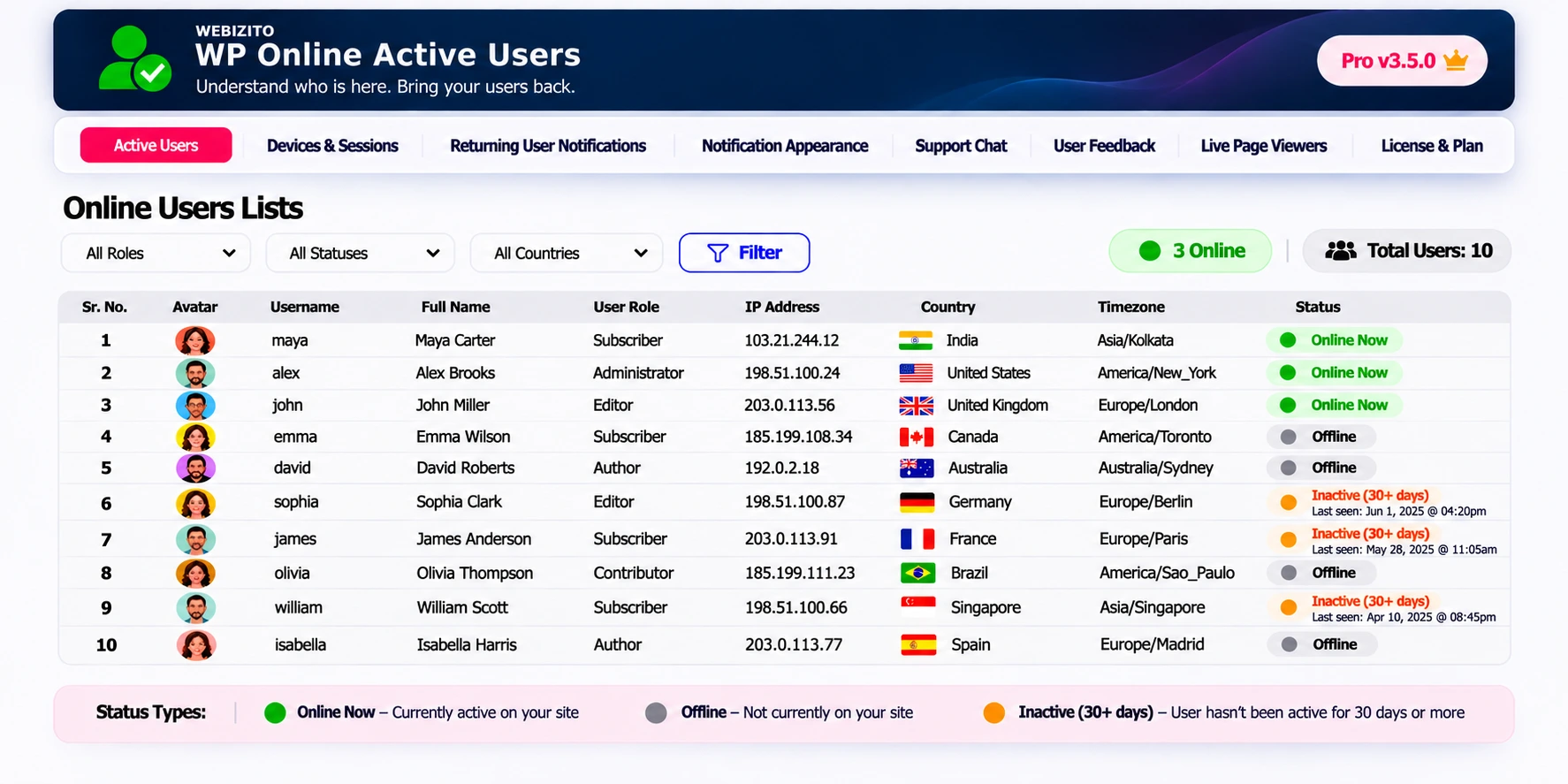
Free gives you online status, last-seen insights and role filters. Pro adds live viewers, engagement tools, session controls and support chat with optional AI replies. Every Pro billing period includes the same features.
Start with Free| Feature | Free | Pro |
|---|---|---|
| Online status, last seen & role filters | Included | Included |
| Admin-bar count, shortcode & block | Included | Included |
| Optional country, timezone & flags | Included | Included |
| Guest + logged-in live page viewers | — | Included |
| Returning user notifications & appearance | — | Included |
| Manual support conversations | — | Included |
| Optional AI-assisted support replies | — | Available with provider API key |
| Feedback campaigns | — | Included |
| Filtered CSV exports | — | Included |
| Device/session insights & login controls | — | Included |
| Announcements & admin email workflows | — | Included |
On smaller screens, scroll the table to compare all features.
AI replies are optional. The site owner supplies a supported provider API key; provider usage is billed separately. Manual support remains available.
A SHORT PATH TO GETTING STARTED
Use the installer in the hero to open your own WordPress admin and activate Online Active Users.
Choose your plan, complete checkout and download the Pro add-on from My Account.
Activate your license. Enable the features you need and match their appearance to your website.
Yes. Online Active Users Pro is an add-on. Keep Online Active Users Free and Pro active on the same WordPress website, then activate your Pro license.
It estimates recent active browsers on the current public page, including guests and signed-in visitors. Multiple tabs in one browser count once per page. Separate browsers, private profiles and devices may count separately; this is not a verified count of unique people.
Yes. Use your own text with the {counter} placeholder, colors, text size, corner radius and placement. Choose minimum viewers, mobile visibility, refresh interval, persistent display or timed hiding.
Guest support applies to Live Page Viewers. Account-based activity lists, welcome-back rules, support conversations and feedback target signed-in users. Public page counts do not reveal visitor names.
Pro support chat supports manual replies by default and optional AI-assisted replies. The site owner must configure a supported provider, model and API key; customers consent before chat content is sent to that provider. Provider usage is billed separately, and unanswered questions can go to the human support inbox.
Each plan covers one website. Manage your activation from My Account; deactivate the old website before moving your license to a new one.
Normal updates on the same installation retain your existing key and settings. Eligible releases are available through My Account and the Pro updater. Automatic installation depends on your WordPress update settings.
Enter your WordPress website URL in the hero section. The helper opens your own WordPress plugin installer. Sign in if asked, then click Install Now and Activate. It does not install remotely or request your password.
The Free plugin offers optional IP-based country and timezone lookup. Enable the external lookup service in its settings when appropriate; country flags are loaded locally. Device and browser labels are estimates.
UNDERSTAND WHO’S HERE. BRING YOUR USERS BACK.